 ghostsplit

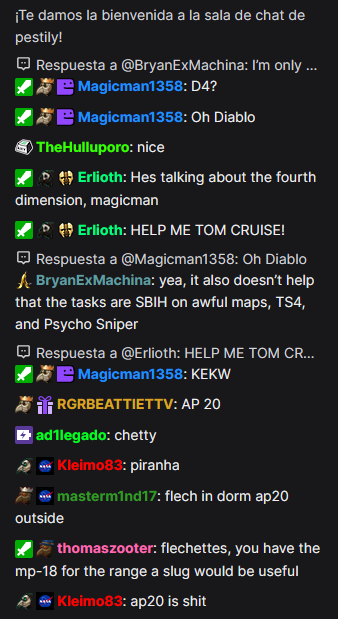
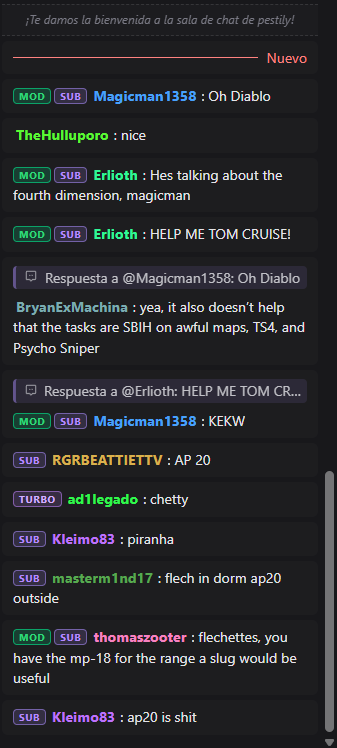
Same chat, before and after
Real twitch.tv chat captured before and after enabling the extension. Same channel, same conversation, same viewport.
Six changes. Nothing hidden.
Pure CSS, no scripts touching your chat. Everything interactive (bits, channel points, 7TV menus) stays exactly where Twitch put it.
Image badges become compact role chips: HOST, MOD, GMOD, VIP, FOUNDER, STAFF, ADMIN, TURBO, PRIME, BITS, SUB.
Neon reds, yellows and limes are mixed toward the background so they stay legible on dark and light themes.
Less padding, baseline-aligned badges and names, and a hard cap on emote height so no 7TV giant breaks the line.
Channel-point redeems, watch streaks and sub / raid notices each get their own card style.
Every rule is paired for Twitch's own DOM and 7TV's, so BetterTTV and FrankerFaceZ keep working too.
Follows Twitch's theme automatically and re-tunes the color mixing for each.
Thirty seconds, no account
Same three steps in Firefox and Chrome. Reload any open twitch.tv tab afterwards.
Use the Firefox or Chrome button above; both go to the official store listing.
Click “Add to Firefox” / “Add to Chrome” and accept the single permission: twitch.tv.
Reload twitch.tv. Badges become pills and usernames calm down immediately. Nothing to configure.
Preserved on purpose
The extension hides nothing that's interactive or load-bearing. Specifically left alone:
- Bits / cheer button.
- Channel-points balance and claim flow.
- All redeem, milestone, and cheer-tier badges.
- Twitch's collapse-chat and theatre-mode controls.
- 7TV's settings button and emote menu.
Questions
Does it collect any data?
No. No network requests, no analytics, no tracking, no localStorage, no cookies, no remote code. The only permission is access to twitch.tv so the chat can be restyled.
Does it work with 7TV, BetterTTV or FrankerFaceZ?
Yes. Every visual rule is written twice, once for Twitch's native chat DOM and once for 7TV's, so those extensions keep working unchanged.
Can I turn it off for one channel?
Not yet, it's all or nothing. Disable the extension from your browser's add-ons page to get the stock look back.
Does it support Twitch's light theme?
Yes. It detects the theme Twitch is using and switches to a light-tuned color mix automatically.